Instagram is one of the most popular social media platforms for sharing photos, videos, stories, and short-form content. Whether you use Instagram for personal purposes, business promotion, or digital marketing, image size plays an important role in how your content looks.
I have noticed that many people upload photos and videos without checking the correct Instagram dimensions. As a result, their images sometimes look blurry, get cropped, or do not display properly.
In this guide, I will explain the latest Instagram sizes for 2026, including Instagram post size, story size, Reel size, profile picture size, carousel size, and video dimensions. I will also share some useful tips to help you upload high-quality content.
Let’s get started!
What Is Instagram Size?
Instagram size means the recommended width and height of an image or video that you upload to Instagram. These dimensions are usually measured in pixels (px).
Every Instagram content format has different size requirements. For example, a regular feed post has different dimensions from an Instagram Story or Reel.
Using the correct Instagram size helps your content look clear, professional, and attractive. It also reduces unwanted cropping and quality problems.
Instagram Image Sizes at a Glance (2026)
Here is a quick overview of the recommended Instagram image sizes:
| Instagram Content | Recommended Size | Aspect Ratio |
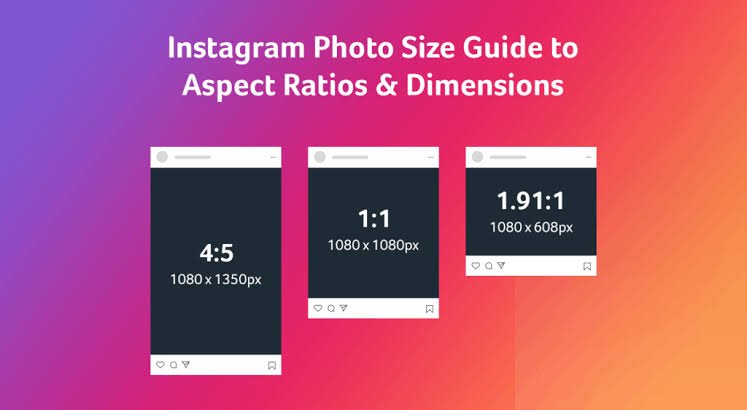
| Square Post | 1080 × 1080 px | 1:1 |
| Portrait Post | 1080 × 1350 px | 4:5 |
| Tall Portrait Post | 1080 × 1440 px | 3:4 |
| Landscape Post | 1080 × 566 px | 1.91:1 |
| Instagram Story | 1080 × 1920 px | 9:16 |
| Instagram Reel | 1080 × 1920 px | 9:16 |
| Reel Cover | 1080 × 1920 px | 9:16 |
| Profile Picture | 320 × 320 px | 1:1 |
| Carousel Post | 1080 × 1080 px or 1080 × 1350 px | 1:1 or 4:5 |
| Instagram Live Video | 1080 × 1920 px | 9:16 |
These are practical design recommendations. Instagram can support different dimensions depending on the content format and publishing method.
1. Instagram Post Size
Instagram feed posts are one of the most common ways to share photos, graphics, and updates. You can upload square, portrait, and landscape images.
Choosing the right Instagram post size helps your photos look better on mobile screens.
Instagram Square Post Size
- Recommended size: 1080 × 1080 pixels
- Aspect ratio: 1:1
- Shape: Square
Square posts are perfect for product photos, quotes, promotional graphics, and personal pictures.
They are also easy to design because the width and height are equal.
Instagram Portrait Post Size
- Recommended size: 1080 × 1350 pixels
- Aspect ratio: 4:5
- Shape: Vertical
Portrait posts are a popular choice because they take up more vertical space in the Instagram feed than square images.
I recommend using this size for photography, educational graphics, business promotions, and informational posts.
Instagram Landscape Post Size
- Recommended size: 1080 × 566 pixels
- Aspect ratio: 1.91:1
- Shape: Horizontal
Landscape posts are useful for wide photographs, travel pictures, group photos, and scenic views.
However, they take up less vertical screen space than portrait posts.
Instagram 3:4 Post Size
Instagram also supports taller 3:4 images.
- Recommended size: 1080 × 1440 pixels
- Aspect ratio: 3:4
- Shape: Vertical
This format is useful for photos captured with many smartphone cameras. It can also fit the newer vertical profile-grid preview more naturally.
2. Instagram Story Size
Instagram Stories allow users to share photos and videos that appear in a full-screen vertical format.
Recommended Instagram Story size:
- Width: 1080 pixels
- Height: 1920 pixels
- Aspect ratio: 9:16
This size is suitable for promotional content, personal updates, announcements, polls, and behind-the-scenes videos.
Tips for Better Instagram Stories
- Use high-quality images.
- Keep important text near the center.
- Avoid placing important information too close to the top or bottom.
- Use readable fonts.
- Do not overcrowd your design.
- Use vertical images whenever possible.
Following these tips can help your Stories look clean and professional.
3. Instagram Reel Size
Instagram Reels are short-form videos that help creators, businesses, and brands reach new audiences.
For the best viewing experience, create Reels in a vertical format.
Recommended Instagram Reel size:
- Width: 1080 pixels
- Height: 1920 pixels
- Aspect ratio: 9:16
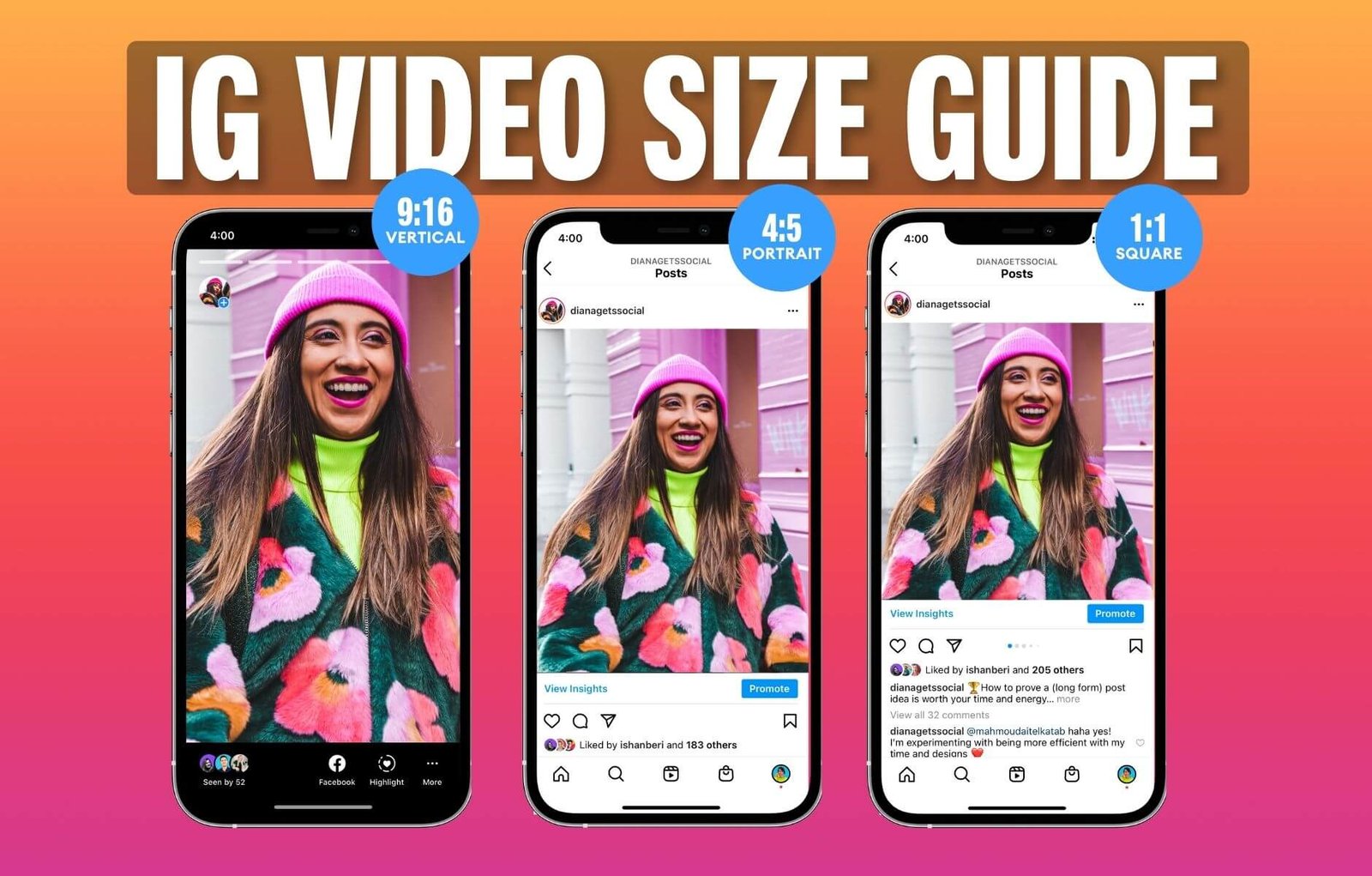
Instagram Reel Video Specifications
| Feature | Recommended Setting |
| Video Size | 1080 × 1920 px |
| Aspect Ratio | 9:16 |
| Video Format | MP4 or MOV |
| Orientation | Vertical |
| Frame Rate | 30 FPS or higher where appropriate |
| Video Quality | High resolution |
Tips for Creating Better Reels
- Record videos vertically.
- Use good lighting.
- Keep your main subject in the center.
- Add clear captions and text.
- Use high-quality audio.
- Avoid placing important text behind Instagram buttons.
- Choose an attractive cover image.
Using the correct Reel dimensions can make your videos look more professional on mobile devices.
4. Instagram Profile Picture Size
Your Instagram profile picture helps people recognize your account. It is visible on your profile, comments, messages, and other areas of Instagram.
Recommended profile picture size:
- Width: 320 pixels
- Height: 320 pixels
- Aspect ratio: 1:1
Instagram displays profile pictures inside a circular frame, even though you upload a square image.
Tips for Instagram Profile Pictures
- Use a clear and high-quality photo.
- Keep your face or logo in the center.
- Avoid small text.
- Use a simple background.
- Leave some space around the edges.
If you manage a business account, using a recognizable brand logo is a good idea.
5. Instagram Carousel Post Size
Instagram carousel posts allow you to share multiple photos or videos in one post. People can swipe left or right to see the next slide.
You can use carousels for tutorials, product collections, educational content, step-by-step guides, and photo albums.
Recommended carousel dimensions:
- Square: 1080 × 1080 pixels
- Portrait: 1080 × 1350 pixels
- Tall portrait: 1080 × 1440 pixels
Important Carousel Tips
- Keep all slides in the same aspect ratio.
- Use consistent colors and fonts.
- Make the first slide attractive.
- Keep your text easy to read.
- Use clear and relevant images.
For the best results, prepare every slide using the same dimensions. Instagram may crop other slides to match the first slide’s format.
6. Instagram Reel Cover Size
A Reel cover is the thumbnail image people see before opening your video. It can help make your Instagram profile look more organized and attractive.
Recommended design size:
- Width: 1080 pixels
- Height: 1920 pixels
- Aspect ratio: 9:16
Although the cover is designed vertically, Instagram may show a cropped preview in your profile grid.
Keep the title, logo, and main subject near the center so they remain visible in different previews.
7. Instagram Video Size
Instagram supports video content in different formats, including feed videos, Stories, and Reels.
The best video dimensions depend on where you want to publish your content.
| Video Type | Recommended Size | Aspect Ratio |
| Feed Video (Portrait) | 1080 × 1350 px | 4:5 |
| Feed Video (Square) | 1080 × 1080 px | 1:1 |
| Story Video | 1080 × 1920 px | 9:16 |
| Reel Video | 1080 × 1920 px | 9:16 |
| Landscape Video | 1080 × 566 px | 1.91:1 |
For better results, export videos in a high-quality format and check how they appear before publishing.
8. Instagram Live Video Size
Instagram Live allows users to broadcast videos in real time and communicate with their followers.
For vertical mobile viewing, a practical design target is:
- Width: 1080 pixels
- Height: 1920 pixels
- Aspect ratio: 9:16
Make sure your camera is positioned correctly and that your face or main subject is clearly visible.
9. Instagram Highlight Cover Size
Instagram Highlights let you keep selected Stories on your profile even after the original Story disappears.
A square image works well when designing a Highlight cover.
Recommended design size:
- Width: 1080 pixels
- Height: 1080 pixels
- Aspect ratio: 1:1
Instagram displays Highlight covers as circles. Therefore, keep icons, logos, and important designs in the center.
10. Instagram Ad Image Size
If you use Instagram for business promotion, selecting the right advertising image size is important.
Here are some practical dimensions for common ad placements:
| Instagram Ad Type | Recommended Size | Aspect Ratio |
| Feed Image Ad | 1080 × 1080 px | 1:1 |
| Portrait Feed Ad | 1080 × 1350 px | 4:5 |
| Story Ad | 1080 × 1920 px | 9:16 |
| Reel Ad | 1080 × 1920 px | 9:16 |
| Landscape Ad | 1080 × 566 px | 1.91:1 |
Always check the latest Meta advertising requirements before launching a paid campaign because placement rules can differ.
11. Best Image Format for Instagram
Choosing the right image format is another important part of uploading high-quality content.
Here are some common formats:
JPG or JPEG: Best for regular photographs because they offer good image quality with smaller file sizes.
PNG: Useful for logos, text-based graphics, icons, and images that need sharp edges or transparency.
MP4: A popular format for uploading videos and Reels.
MOV: Another video format supported in Instagram workflows.
For most regular photographs, JPG is a good choice. For graphics containing text or logos, PNG can be useful.
12. Why Is Instagram Image Size Important?
Using the correct Instagram dimensions offers several benefits.
Better Image Quality
When you upload an image with suitable dimensions, it is less likely to become blurry or stretched.
Professional Appearance
Correctly sized images help your profile look clean and organized.
Less Unwanted Cropping
The right aspect ratio helps prevent Instagram from cutting off important parts of your photos.
Better User Experience
People can view your images and videos comfortably without unnecessary cropping or poor formatting.
Consistent Branding
Using consistent dimensions, colors, and designs can make your business profile look more professional.
13. How to Resize Images for Instagram
You do not need advanced graphic design skills to resize your images. Several online tools and applications can help you prepare Instagram content.
Here are some useful options:
Canva: A popular design platform with ready-made Instagram post, Story, and Reel templates.
Adobe Express: Useful for resizing images and creating social media graphics.
Picsart: Helps you edit photos, crop images, and create attractive designs.
Photoshop: A professional tool for advanced image editing and resizing.
Simple Steps to Resize an Instagram Image
- Open your preferred editing tool.
- Upload your photo.
- Select the correct Instagram dimensions.
- Adjust the image to fit the frame.
- Check that important content is not cropped.
- Export the image in a suitable format.
- Upload it to Instagram.
These simple steps can help you prepare better-quality Instagram content.
14. Common Instagram Size Mistakes to Avoid
Many users make small mistakes when preparing images and videos for Instagram.
Here are some mistakes you should avoid:
- Uploading very low-resolution images.
- Using the wrong aspect ratio.
- Cropping important parts of a photo.
- Placing text too close to the edges.
- Using horizontal images for full-screen Stories.
- Designing carousel slides with different dimensions.
- Ignoring how Reel covers appear in the profile grid.
- Uploading heavily compressed images.
Before publishing, always preview your content to make sure everything looks correct.
15. My Recommendations for the Best Instagram Sizes
If you are confused about which Instagram size to choose, here are my recommendations:
- For regular feed posts: 1080 × 1350 pixels.
- For square graphics: 1080 × 1080 pixels.
- For taller feed photos: 1080 × 1440 pixels.
- For Instagram Stories: 1080 × 1920 pixels.
- For Instagram Reels: 1080 × 1920 pixels.
- For profile pictures: 320 × 320 pixels.
- For Highlight covers: 1080 × 1080 pixels.
I recommend saving these dimensions so you can use them whenever you create new Instagram content.
Conclusion
Choosing the correct Instagram size is important if you want your photos, videos, Stories, and Reels to look clear and professional.
For most feed posts, 1080 × 1350 pixels is a great choice. For Stories and Reels, use 1080 × 1920 pixels. For profile pictures, a square image around 320 × 320 pixels is a practical option.
I hope this complete Instagram size guide helps you create better content and avoid common image and video sizing problems.
Remember to check your images before uploading and always use the dimensions that match your content type.